




You have a flight and want a smooth ride to Reagan National Airport with no parking stress and no dragging luggage through the Metro. You want a professional chauffeur waiting for you, but how do you book the service online without making mistakes?
Booking a limo service online is easy but there are a few common mistakes people make. Many travelers enter the wrong pickup time, forget to add their flight number or choose a vehicle that does not have enough space for their luggage. These small mistakes can create unnecessary problems on the day of travel.
This guide explains every step of the process. By the end, you will know exactly how to book DCA limo service online and what to check before confirming your booking.
Why Book Your DCA Limo Online Instead of Calling
When you book your flight online you get everything in writing. You do not need to rely on memory for what was discussed on the call. Your pickup time, your vehicle type, and your total cost are all given to you in a confirmation email the moment you finish your booking.
You can book online anytime you want. When you call for booking there needs to be someone available on the other end. Plus, many travelers hesitate to call at midnight, even if the company offers 24/7 customer service. Some other benefits of online booking are:
- Instant reservations
- Easy vehicle selection
- Upfront pricing
- Flight information tracking
- Email confirmations
- Faster booking process
What You Need Before You Start
Before you open the booking page gather a few details because having these ready makes the booking process faster.
- Your flight information: Gather details of your flight including flight number, airline and the date and time of your flight. These details are important because your chauffeur tracks the flight in real time and receives updates about any delays or schedule changes.
- Your pickup or drop-off address: If you are heading to DCA then you need your correct pickup address. If you are arriving at DCA then you need your destination address.
- Number of passengers: Confirm the total number of passengers who need transportation so that you can choose the most appropriate vehicle.
- Amount of luggage: A rough idea of bags and carry ons helps the system or the booking agent to recommend the most suitable vehicle.
- Your contact information: Phone number and email so that your confirmation details and any updates reach you.
Step One: Go to the Booking Page
First go to the car service website and find the booking page. Most professional car services have a clear “Book now” or “Make Reservation” button on their homepage. That leads you to a simple online form.
You can also look for a page that is specifically built for airport transfer if it is available. Some companies have separate airport bookings from general point to point bookings because airport transfers require flight tracking details that are not added in a regular booking.
Step Two: Choose Your Trip Type
The booking system asks whether you need a pickup from DCA or drop-off at DCA so select the correct option because it changes the form structure. Common choices include:
- Airport pickup
- Airport drop-off
- Round-trip service
- Hourly service
Step Three: Enter Your Flight Details
Enter your flight number and airline carefully. Once this information is confirmed in the system your car service can track your flight automatically. If your flight is delayed, your driver adjusts their pickup time. You do not need to call your service provider for an updated time or rebook your ride.
Step Four: Enter Pickup and Drop-Off Addresses
Type the full address for your pickup or drop-off location; also add any important details that matter like an apartment number or a building entrance. If you are picked up from a residential building then mention any access instructions like a gate code or a specific gate to use. These small details save the time of your chauffeur as well as your trip.
Step Five: Select Your Vehicle
Most booking systems show you recommended vehicle options when you add details of your trip and group size. Common vehicle options given by chauffeur service providers are:
| Vehicle Type | Best For |
| Executive Sedan | 1 to 3 passengers, standard airport run |
| Luxury SUV | 4 to 6 passengers, more luggage |
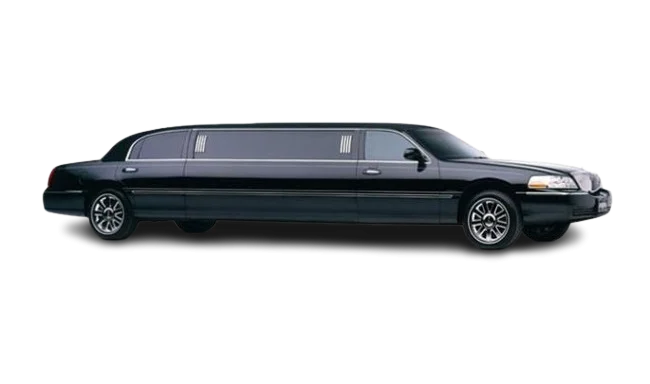
| Lincoln Stretch Limo | Special occasions, larger group |
| Executive Van | 7 to 12 passengers |
Pick the best suited vehicle based on your group size and luggage. If you are not sure about it, choose a slightly larger vehicle than you think.
Step Six: Add Meet and Greet If You Want It
Many DCA limo service providers let you add meet and greet service. This means your chauffeur comes inside the terminal and meets you at the baggage claim with a name sign rather than waiting at the parking area.
If you are a first time visitor or have heavy luggage then this is worth selecting if offered by your services. There is sometimes a small additional fee for this option so check before confirming.
Step Seven: Review Your Price
Before you confirm the system should show you a clear fixed price. This should include the base fare and clearly state whether gratuity, tolls or any additional fees are included or not. If the price shown is unclear do not confirm the booking. Contact the company directly to clarify before you pay.
Step Eight: Enter Payment and Contact Details
Fill in your contact information and payment method. Most online booking systems accept major credit cards. Some allow you to pay the full amount at the time of booking while others may only require a deposit so that the balance is charged after your trip.
Double check your email address and phone number here. You will receive confirmation and further updates from them.
Step Nine: Confirm and Save Your Confirmation
Once you submit your booking form, you should receive a confirmation email almost immediately. The email typically includes:
- Your pickup time and address
- Your flight details
- Your vehicle type
- A confirmation or booking number
- A contact number for the car service
Book Your DCA Limo Service Online with AA Limousine and Sedan
AA Limousine and Sedan provides airport limo and car services to and from DCA. We have made our online reservation system very easy. Just go to our official website, go to the online reservation form, choose your vehicle, enter your flight details and receive confirmation quickly. Our chauffeur monitors your flight, arrives on time and gives you a smooth and stress free travel experience. Book your DCA airport limo online today and arrive knowing every detail is already taken care of.
FAQs
Can I book a DCA limo online for the same day?
Yes, usually professional car services accept same day bookings but it depends on the availability of a driver and specific vehicle. It is better to book as early as possible to guarantee your preferred vehicle.
Do I need to create an account to book online?
It depends on the company. Most online booking systems allow you to make a reservation as a guest using only your contact information. However, many companies recommend creating an account because it makes future bookings faster and easier.
What happens if my flight is delayed after I book online?
When you add your flight number in the booking form, your car service tracks it automatically. Your pickup time adjusts based on your actual arrival, so you do not need to contact anyone to update it yourself.
Can I change my pickup address after booking?
Yes, in most cases. Contact the car service directly using the number in your confirmation email to update any details before your trip.